Launching4 min read
Traits, layers and rarity 101
How a generative collection is built from layers and traits, how rarity weights work, and how to set it all up on KURV, with Max Cat as the example.
KURV teamAlso in Español, Português (Brasil)
On this page11 sections
Most NFT collections with thousands of different-looking pieces weren’t drawn piece by piece. They’re built from layers. Here’s how that works, using Max Cat (the cat on kurv.fun’s homepage) as the example, and how to set it up on KURV.
The short answer
- A layer is one part of the picture: background, body, eyes, hat.
- A trait is one option for that layer: background sunset, eyes sleepy, hat crown.
- Stack one trait from each layer, back to front, and you get a piece.
- Rarity is how often each trait shows up.
Software picks a trait per layer for each piece. On KURV, you hand over a folder of layers and KURV builds every piece for you.
The Max Cat example
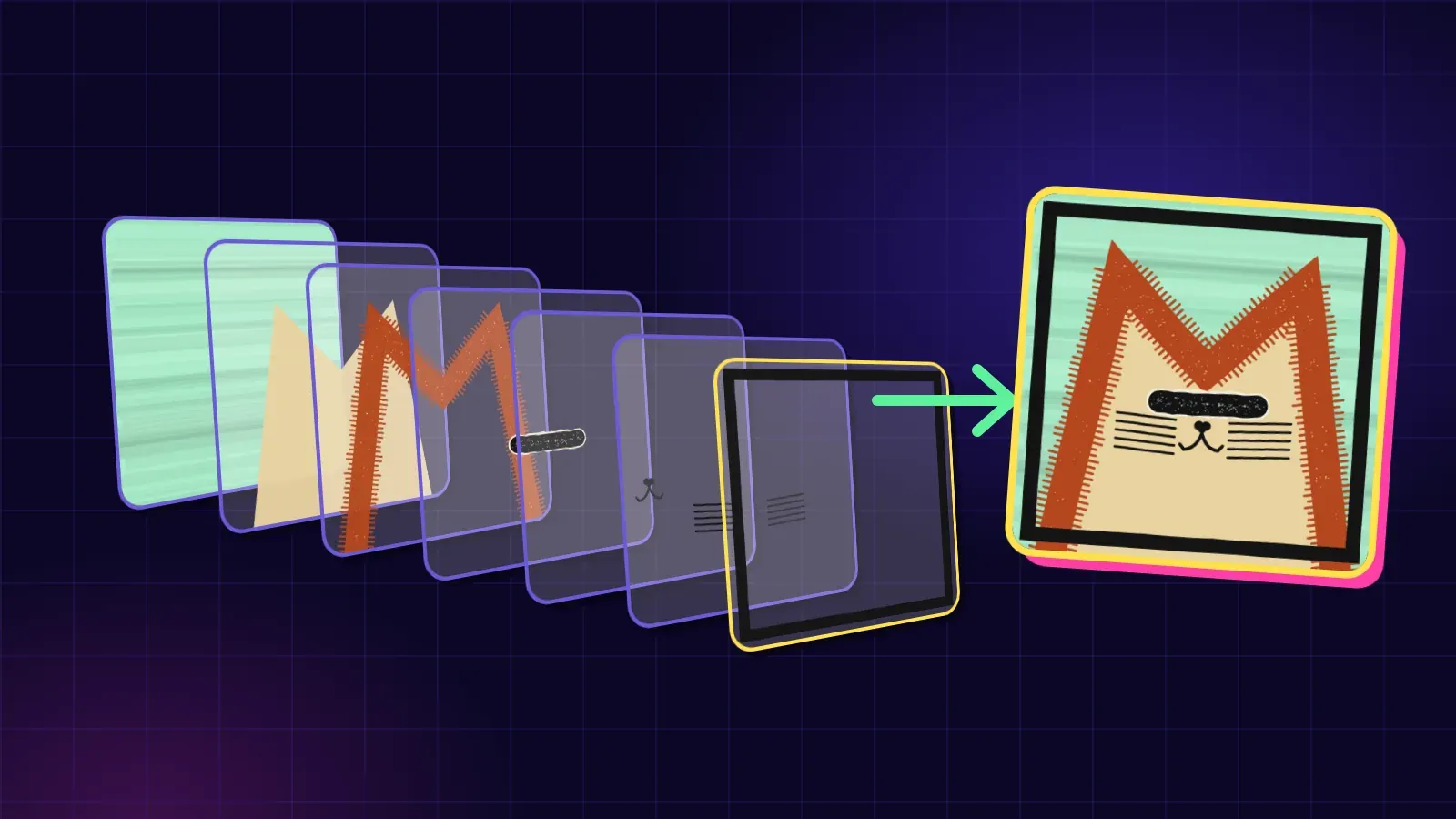
Max Cat is Charvel’s first KURV collection, and it’s built from seven layers, back to front:
- Background
- Fur
- Head
- Eyes
- Nose
- Whiskers
- Frame
Each layer has several traits, and every cat is one trait from each. That’s why the cats all clearly belong together but each one has its own attitude. The homepage animation on kurv.fun literally takes one finished cat apart into those seven layers.
How KURV reads your folder
my-collection/
  layers/
    01_Background/
      Dunes#40.png
      Night#10.png
    03_Body/
    12_Headwear/
      None#40.png
      Cap#30.png
      Visor#25.png
Crown#5.png- One folder per layer, with transparent PNGs inside. Each file is one trait.
- The number in front of the folder name sets paint order, bottom to top, so
01_Backgroundgoes on first. The name after the number is what collectors see as the layer name. - The file name before
#is the trait name.Crown#5.pngbecomes the trait “Crown.” - A trait can be an animated GIF too. Then every piece is published as an animated GIF.
On a phone, zip the layers folder and use Pick a ZIP on Create.
Rarity: the number after #
The number after # is the trait’s weight, and it only counts against other files in the same folder.
Dunes#40shows up four times as often asNight#10.- A file with no number counts as 1. A folder with no numbers starts out evenly split.
#0means the trait is never picked at random. Use it for a trait only a hand-pinned piece wears.- Collectors never see the number.
Tip: make each layer add up to 100 so anyone can read it at a glance.
You don’t have to get it perfect in the file names. In the Studio, each layer has a slider per trait showing its share and piece count (like ”≈ 20 of 1,000”). Need an exact number? Set a trait to Exactly, At least or At most. For example, Gold = exactly 6.
“No hat” is a trait too (sort of)
For a layer some pieces skip, put one blank file named None in that folder with a weight, like None#40.png. Next to Cap#30, Visor#25 and Crown#5, that means about 40 in 100 pieces have no headwear.
Gotchas:
None.png,none.png,None#40.pngall work.Blank,EmptyorNo Hatdon’t; they become traits with those names.- Leave it blank. Anything drawn in it gets thrown away.
- One per folder, and never on the bottom layer.
Canvas: same square, every file
- Every image is the same square. KURV recommends 1000 × 1000 (set in
layers.json, anywhere from 1000 to 4096). - Each trait is a full-size transparent image with its part drawn in place. An eyes file is 1000 × 1000 with eyes on it, not a tiny picture of eyes.
- The bottom layer fills the frame.
- A file of a different size lands small or cropped on every piece that wears it. The import warns you.
Rules and hand-picked pieces
In the Studio you can also:
- Write rules: “Never combine Body: Triangle with Hat: Crown,” or “If Eyes is Laser, Background must be Gold or Pink.”
- Let KURV suggest rules by measuring your pixels, e.g. “Beanie hides 100% of Mohawk.”
- Pin pieces you want to design yourself, with a name and an optional piece number like #1. Pinned pieces count toward supply.
- Run the check to make sure the collection you asked for can actually be made.
All of this runs in your browser, for free, before any money is involved.
How rarity gets scored
KURV scores every piece the same way: a piece’s score is the sum of 1 ÷ how common each of its traits is, and rank 1 is the rarest. Ties share a rank.
Rarity describes how uncommon a combination is. It isn’t a price and it doesn’t promise value. What anything sells for is up to the market.
Don’t want layers?
If you drew every piece one at a time, skip all this. Bring an art folder (1.png, 2.png…) plus a metadata.json listing each piece’s traits, and KURV scores rarity the same way.
Quick checklist before you import
- Every image is the same square size
- Every layer folder is numbered, back to front
- Each optional layer has exactly one blank
Nonefile, and the bottom layer has none - Stack one random trait from each layer in an image editor. It should look finished and lined up
Next steps
- See Max Cat’s layers: kurv.fun
- Try the Studio on testnet: testnet.kurv.fun, where coins are free and nothing has value
- Full folder spec: Prepare your layers · Studio, rules and generate
- Making something? Apply to publish
- Ready to publish? How to put your collection on KURV


